RSS Feedings
What's New...
30 Most Recent
dougscrptr
Site Menu
[ Home
[ What's New
[ 446 Scripts...
- ...by category:
- Managing Tracks
- Managing Track Info
- Managing Artwork
- Managing Playlists
- Controlling iTunes
- Exporting Info
- Managing Files
- Networking
- Internet
- iPod
- Miscellaneous
- With Other Apps
- Retro Scripts
- Script List
[ Download FAQ...
[ Forum at iLounge
[ dougscrptr
[ Twitter
[ my delicious
[ Uhm, Windows?
Shareware Apps
- Dupin v1.3.4
- Join Together v5.3.1
- iTunes Library Manager v5.1
Site Info
- Who's Doug?
5 Most Recent Downloads in
Managing Files
Links point to a script's entry page...
- Files to Folder Scripts Two scripts to copy and create aliases of selected files
- Create Archive of Selected Create a .zip archive of the files of selected tracks
- Track Splicer Join any two (or more) MP3 tracks
- List Folder Files Not Added Creates a text file listing audio files in a Music folder not added to iTunes
- List Music Folder Files Not Added List files in chosen folder(s) which aren't in iTunes
10 Most Recently Added:
Links point to a script's entry page...
- 3 days ago:
Rip To iPod v2.1
Rips CD tracks straight to iPod - 3 days ago:
New iPod Playlist From Selection v3.1
Copy selected tracks or playlist to a new iPod playlist - 3 days ago:
Lossless to AAC Workflow v2.1
Two scripts assist with importing/managing Lossless files and sending converted AAC copies to iPod - 7 days ago:
Update Expired Podcasts v2.0
Update podcasts which have expired by virtue of being ignored for five or more days - 7 days ago:
Add from Amazon MP3 Folder v1.0
Add files from the Amazon MP3 downloads folder to iTunes - 7 days ago:
Add from eMusic Downloads Folder v1.0
Add files from the eMusic downloads folder to iTunes - 11 days ago:
GET Available Podcast Episodes v2.0
Download any or all available subscribed Podcast episodes not yet downloaded - 13 days ago:
Make Video Tags v1.2
Application assists with batch-editing video track tags - 13 days ago:
Clipboard to Multi-Tracks Lyrics v1.0
Paste text contents of the clipboard to each of the selected tracks' Lyrics tag - 14 days ago:
Make Bookmarkable v2.5
Change file type to make selected AACs bookmarkable - the 30 most recent...
30 Most Recent RSS Feed
Your donation allows me keep the site up-to-date, fun, and easy to use. Thanks!
Donations of any convenient size help defray my personal costs in keeping the site going. Making a contribution via Amazon Honor, Kagi, or PayPal is easy, safe, and secure. Future visitors salute you!
Purchase Superb dougscripts.com Shirts & Mugs from CafePress

Purchasing recommended products from Amazon also supports the site!
Top 11 Downloads
Links point to a script's entry page...
[#] = total downloads
- Make Bookmarkable [120513]
- Super Remove Dead Tracks [99799]
- Find Album Artwork with Google [77706]
- Corral iTunes Dupes [66421]
- Import iPod Audio Files [62259]
- CDDB Safari Kit [39587]
- Tracks Without Artwork to Playlist [37704]
- Remove Duplicate Tracks From Playlist [34743]
- Corral All Dupes [29047]
- Set Video Kind of Selected [25449]
- Remove n Characters From Front or Back [24605]
- full list...
Other Sites' Favorites
lifehacker: Top 13 iTunes AppleScripts
Playlist: Top 10 iTunes AppleScripts
Macworld: iTunes' "hidden" features
10 Random Scripts
Links point to a script's entry page...
- Copy From Start to Stop Copy the file of the selected track using its Start and Stop times
(Managing Files) - Swap Album with Genre Switch Genre name with Album name
(Managing Track Info) - Rip To iPod Rips CD tracks straight to iPod
(iPod) - Export Via QuickTime Save files of iTunes tracks using QuickTime Pro audio codecs
(Managing Files) - Print Helper Store your current iTunes Print settings to apply again later
(Controlling iTunes) - Enter Long Description Text for Selected Enter text for the selected tracks' Long Description tag
(Managing Track Info) - Playlist from Selected Scripts Scripts to assist in making new playlists
(Managing Playlists) - Remote Management Scripts Manage shared tracks over a network
(Networking) - CK's Equally-Timed iPod Playlists Create iPod playlists of equal time length
(iPod) - Track Splicer Join any two (or more) MP3 tracks
(Managing Files)
Managing Files 1 2 3 4 5
Hey! Because a script entry's location can change over time, the URL in the address bar of your browser should not be copied or bookmarked. To accurately bookmark or copy the URL of an entry, control-click or right-click on its title or permalink for this entry button and select an option from the pop-up.
Lossless to AAC Workflow v2.1 
Two scripts assist with importing/managing Apple Lossless audio files and sending converted AAC copies to a mounted iPod set to "manually manage songs and videos".
Lossless to AAC Workflow (CD->iPod):
- Imports each enabled CD track as an Apple Lossless file
- Makes a converted AAC copy of each imported Lossless file
- Adds the AAC file to iPod, deleting the original AAC from iTunes.
Lossless to AAC Workflow (iTunes->iPod):
- Makes a converted AAC copy of each Lossless track selected in iTunes
- Adds the AAC file to iPod, deleting the original AAC from iTunes.
In this way you can keep archived Lossless files on your hard drive, and manageable AAC files on your iPod.
This collection no longer includes a third script which would assist with syncing tag data.
- Latest version:
- Fixes intermittent copying issue
- v2.0:
- Runs as universal binary
- Fixes error issues when determining if and how many CDs are mounted
- Multiple mounted iPods and CDs are selectable
- Checks for manually managed/sync'd iPod settings; only works with manually managed iPods
- Reduced options, assumes import and convert tasks
- iPod capacity routine re-instated
- Streamlined code
- Minor performance fixes and finessings
- Info:
- build type: Universal Binary
- written by Doug Adams
- latest version posted: August 17, 2008
- latest version downloads: 63 | total downloads: 7167
- zip download size: 160.3K
Make Bookmarkable v2.5 
This script will change the file type of the selected AAC tracks to "M4B " and file extension to ".m4b", thus making them bookmarkable. (That is, the track will resume playing wherever you left off the last time you played it.) Additionally, when used with iTunes 7 or better, deletes and re-adds each track so it will appear in the Audiobooks Library. Ratings, play count, last played date, skip count, and skipped date are preserved.
- Latest version:
- Compatible with iTunes 7.7.1
- v2.4:
- Fixes problem with files located on MS-DOS FAT32 formatted drives
- v2.3:
- Saved as universal binary
- Info:
- build type: Universal Binary
- written by Doug Adams
- latest version posted: August 6, 2008
- latest version downloads: 2291 | total downloads: 120513
- zip download size: 98.4K
Re-Add Selected Tracks as Podcast v1.2 
This script will re-add the files of the selected tracks to iTunes as if they were a Podcast subscription. The files will then appear in the Podcasts playlist and "behave" as though they are a group of Podcast episodes. Such a Podcast can be set to automatically be copied to iPod and appear in the Podcasts category.
Requires "Web Sharing" be activated in System Preferences.
NOTE: There is a known Leopard/Apache bug that may prevent Web Sharing from working correctly. Many users facing this problem have had success using information from this link and item 5 from this link.
- Latest version:
- Runs as universal binary
- Compatible with iTunes 7.7.1
- Info:
- build type: Universal Binary
- written by Doug Adams
- latest version posted: August 5, 2008
- latest version downloads: 252 | total downloads: 8499
- zip download size: 168.5K
Make UN-Bookmarkable v3.3 
This script will change the file type of the selected AAC tracks--which you have previously made bookmarkable yourself with the script Make Bookmarkable--to "M4A" and file extensions to ".m4a" making them UN-bookmarkable. When used with iTunes 7 or better, each track is deleted and re-added so that it will be removed from the Audiobooks Library. Ratings, play count, last played date, skip count, and skipped date are preserved.
- Latest version:
- Fixes problem with files located on MS-DOS FAT32 formatted drives
- v3.2:
- Saved as universal binary
- Info:
- build type: Universal Binary
- written by Doug Adams
- latest version posted: April 23, 2008
- latest version downloads: 1029 | total downloads: 14034
- zip download size: 97.7K
List Music Folder Files Not Added v2.0 
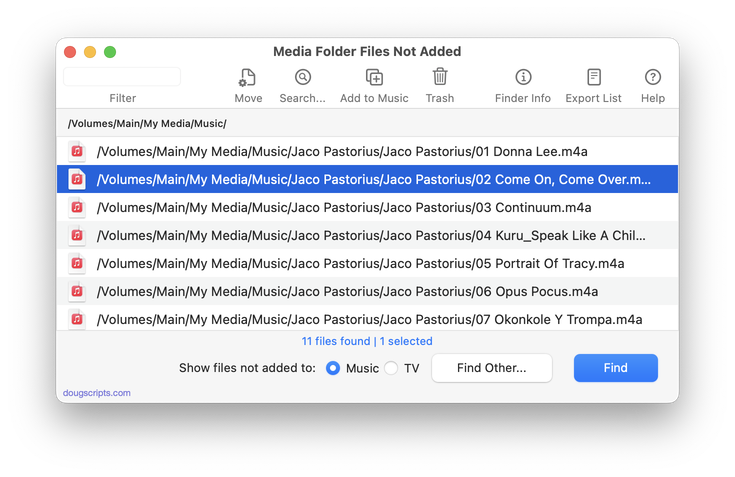
This script recursively searches user-selected folders for files not added to iTunes and creates a text file listing their file paths. Optionally, this text file can be saved as a M3U file and imported by iTunes to add the found files. Requires Mac OS 10.4 or better.
- Latest version:
- Completely re-written.
- Info:
- build type: Plain AppleScript
- written by Doug Adams
- latest version posted: January 21, 2008
- latest version downloads: 3420 | total downloads: 7254
- zip download size: 209.1K
Rip AAC Old School v0.9
This is an AppleScript wrapper for the command line tool afconvert. It will rip CD tracks as AAC using Constant Bit Rate (CBR) so that ripped tracks will all have the same bit rate. The latest versions of iTunes now rip (and convert) tracks to AAC using Average Bit Rate (ABR) or Variable Bit Rate Constrained (VBR_Constrained); these are the settings you get with VBR unchecked or checked, respectively. Thus, ripped tracks will not necessarily have the exact bit rate you select.
Requires Mac OS 10.5 or better.
- Info:
- build type: Plain AppleScript
- written by Doug Adams
- posted: November 16, 2007
- total downloads: 624
- zip download size: 126.6K
Show Meta-Data for Track v1.0
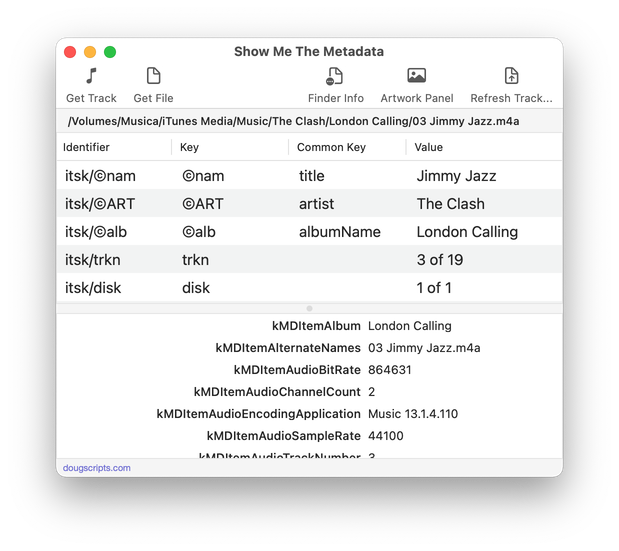
This script will find the Spotlight meta-data for a selected track (using mdls) and display it in Text Edit.
- Info:
- build type: Plain AppleScript
- written by Doug Adams
- posted: September 4, 2007
- total downloads: 934
- zip download size: 104.9K
Convert Movie for iPod
This script will convert a single selected QuickTime movie file in iTunes (.mov) to an iPod Video-compatible file (.m4v) with QuickTime and then add the converted file to iTunes. Additionally, you can choose to add the new file to a Video iPod mounted in iTunes--essentially adding a few steps to iTunes' "Convert for iPod" function. Speedy computer (G4 or better) highly recommended.
Also see Drop to Make M4V movies.
- Info:
- build type: Plain AppleScript
- written by Doug Adams
- latest version posted: October 7, 2006
- total downloads: 4106
- zip download size: 164.2K
List Folder Files Not Added v1.2 
This script will create a text file listing the file paths of any audio files which are not in the iTunes database. The default folder searched is your designated "Music" folder, however you can select any folder or volume that may contain audio files at any level.
This script relies on Spotlight and thus requires Mac OS X 10.4 or better.
- Info:
- build type: Plain AppleScript
- written by Doug Adams
- latest version posted: June 1, 2006
- latest version downloads: 5618 | total downloads: 7712
- zip download size: 200.1K
PDF Adder v2.3 
These three AppleScripts assist with adding PDF files to iTunes as "digital booklet" PDF tracks. Each provides a method for easily supplying Artist and Album tag data which is then applied to the newly-added PDF track:
- Add to iTunes... is a PDF Service workflow that, when installed, will be available in the PDF pop-up menu of the Print Dialog (see screenshot). It allows you to save the current document as a PDF file (from any application that uses the Print Dialog) and add it to iTunes.
- PDF Adder is an applet that will let you choose an existing PDF file and add it to iTunes. It can be installed in iTunes' Scripts folder for easy access from iTunes Script menu.
- PDF Dropper is a droplet that lets you add a PDF file to iTunes by drag-and-drop.
PDFs can be added as tracks to iTunes as of version 4.7, which is how "digital booklets" from the iTMS are handled. Here are some suggestions for your own "digital booklets":
- Album lyrics/liner notes
- Album art and photos
- Music production notes
- Music scores
- DJ set lists
- Podcast addenda
- Audiobook chapter synopses
- Lecture notes
- Sound effects indexes
Anything you can print, you can make into a PDF...and any PDF can be added to iTunes
Also see PDF as iTunes Artwork, which assists with saving PDFs as artwork.
- Info:
- build type: Plain AppleScript
- written by Doug Adams
- latest version posted: May 19, 2006
- latest version downloads: 4077 | total downloads: 6164
- zip download size: 187.6K