frontpage : scripts : here

Managing Track Info 1 2 3 4 5 6 7 8 9 

Hey! Because a script entry's location can change over time, the URL in the address bar of your browser should not be copied or bookmarked. To accurately bookmark or copy the URL of an entry, control-click or right-click on its title or permalink for this entry button and select an option from the pop-up.


Selected Tags to Lyrics v1.1

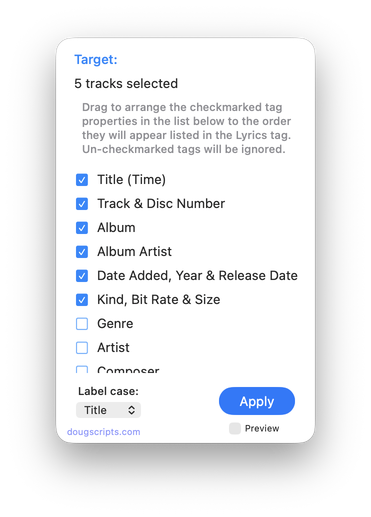
Primarily for iPhone and iPod touch users, this script will copy any combination of Name, Artist, Album, Grouping, Composer, BPM, Comment, (Long) Description, Year and/or Bit Rate tags to the Lyrics tag of the selected tracks, such that this info will be available with a tap when the track is playing. Can append to or replace current Lyrics info.

    Latest version:
  • Accounts for description and long description, preferring the latter
  • Adds "year" and "bit rate" as options
    Info:
  • build type: Universal Binary
  • written by Doug Adams
  • latest version posted: August 20, 2008
  • latest version downloads: 795 | total downloads: 1400
  • zip download size: 289.3K
 

Make Video Tags v1.2

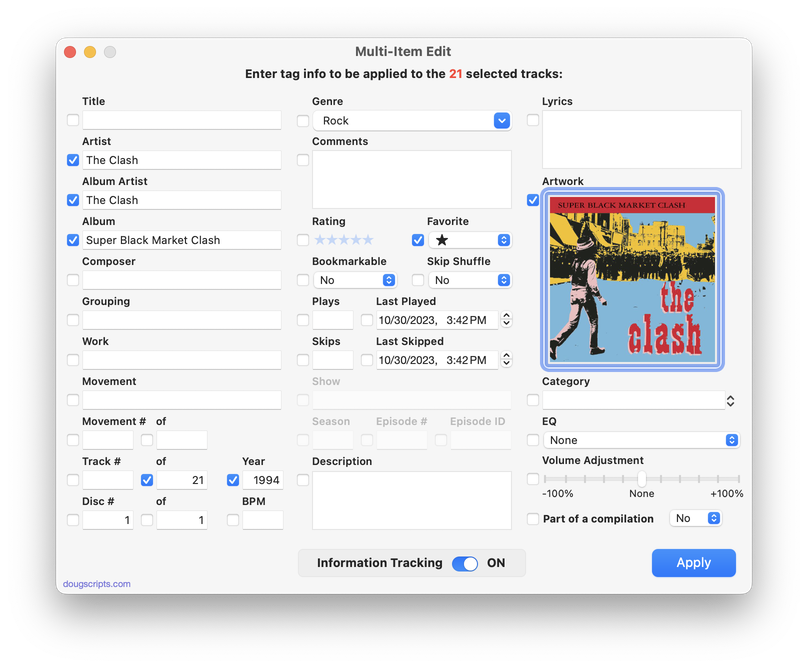
Simply and quickly edit basic tags of a multiple selection of video tracks in iTunes, including show, video kind, season number, description, long description, comments, lyrics, artist, album, genre, rating and enabled; set played/not played; options to automatically increment track numbers and episode numbers and IDs. I created this AppleScript Studio application for my own use--it's a more thorough big brother to my Set Video Kind of Selected script--when ripping DVDs with Handbrake.

Requires Mac OS 10.4 or better.

    Latest version:
  • Enabled Checkbox added
  • Compatible with iTunes v7.7.1
  • v1.1:
  • Can open files and add them to iTunes
  • Send or sync tracks to iPod
  • Adds "Ratings" tag
  • Updates Help pages
  • Other minor performance enhancements
    Info:
  • build type: Application
  • written by Doug Adams
  • latest version posted: August 7, 2008
  • latest version downloads: 2357 | total downloads: 6799
  • zip download size: 1350.9K
 

Clipboard to Multi-Tracks Lyrics v1.0

This script will paste the contents of the clipboard to the Lyrics tag of each selected iTunes track. (For instance, you want the same lyric text for each of your six copies of "Sugar Magnolia".)

    Info:
  • build type: Universal Binary
  • written by Doug Adams
  • posted: August 7, 2008
  • total downloads: 171
  • zip download size: 242.6K
 

Rate Me! Rate Me! v3.0

This stay-open applet watches your playing tracks and when an un-rated track starts playing displays a dialog with a demand it be rated.
While you could easily rate the current track from the iTunes icon in the Dock, this script interrupts you and compels you to do so.

    Latest version:
  • Runs as universal binary
  • Performance finessings
    Info:
  • build type: Universal Binary
  • written by Doug Adams
  • latest version posted: May 15, 2008
  • latest version downloads: 867 | total downloads: 4700
  • zip download size: 150.5K
 

Remove n Characters From Front or Back v3.0

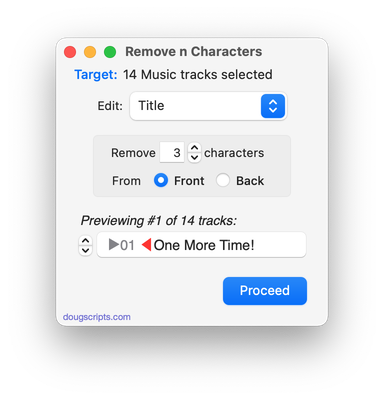
This script lets you delete a specified number of characters from either the beginning or the ending of the Song Name, Album, Artist, Comments or Composer tag of each selected track. For example, delete the initial digits and the space from "01 First Track", "02 Second Track", etcetera.

An earlier version of this script is included in the O'Reilly book iPod & iTunes HACKS.

    Latest version:
  • Runs as universal binary
  • Adds "Comments" to options
  • Performance fixes and finessings
    Info:
  • build type: Universal Binary
  • written by Doug Adams
  • latest version posted: May 13, 2008
  • latest version downloads: 5856 | total downloads: 27439
  • zip download size: 158.1K
 

This Tag, That Tag Scripts v2.0

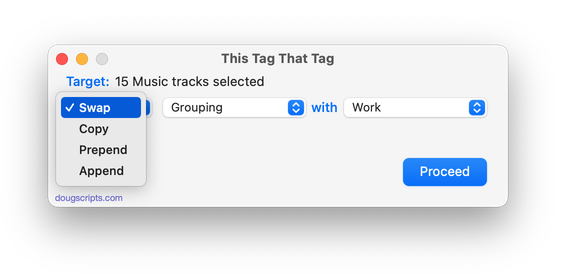
Here are four scripts that assist with swapping, copying, and appending data between two user-chosen tags (Song Name, Album, Artist, Album Artist (iTunes 7 and better), Composer, Comments, Grouping, and sometimes Genre) in selected tracks:

Swap This With That - swap data between tags, ex: ARTIST<->COMPOSER
Put This In That - copy data from one to another tag, ex: ARTIST->COMPOSER
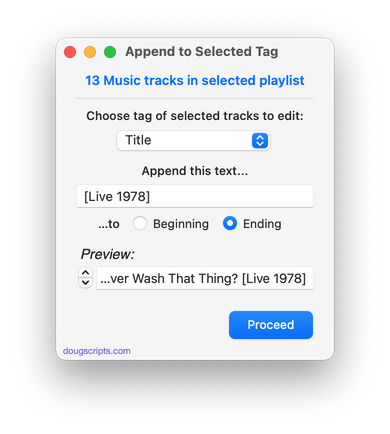
Put This After That - append data from one tag to the end of another, ex: ARTIST->COMPOSER - ARTIST
Put This Before That - prepend data from one tag to the beginning of another, ex: ARTIST->ARTIST - COMPOSER

The latter three scripts also provide you the option of deleting the info from the first tag after the copy. Read Me explains all.

    Latest version:
  • Saved as script bundles (universal binary)
  • Adds "Show" tag
  • Consolidation of code
    Info:
  • build type: Universal Binary
  • written by Doug Adams
  • latest version posted: April 22, 2008
  • latest version downloads: 3249 | total downloads: 18643
  • zip download size: 121.9K
 

De-Genre v2.1

This script re-assigns the Library tracks of selected Genres to another Genre so that the original--and consequently un-assigned--Genres disappear from iTunes' Genre pop-up list.
As you may know, you can make many superfluous Genres vanish from iTunes' Genres pop-up list simply by eliminating a reference to them in your tracks; when no tracks are assigned to a particular Genre, that Genre will be dropped. (iTunes original Genre names cannot be removed this way; only those accumulated from other sources or created by you.) Of course, you could use iTunes' multiple editing feature to do this as well, but the script doesn't require you to select batches of tracks and thus saves a few steps.

    Info:
  • build type: Plain AppleScript
  • written by Doug Adams
  • latest version posted: November 21, 2007
  • latest version downloads: 2769 | total downloads: 7185
  • zip download size: 106.7K
 

Album Rating Reset v1.0

This script will allow you to set the Album Rating for the album of the selected track to with full- and half-star ratings, or reset the Album Rating to its computed "clear-star" default rating. Requires iTunes 7.4 or better.

    Info:
  • build type: Plain AppleScript
  • written by Doug Adams
  • posted: September 6, 2007
  • total downloads: 1330
  • zip download size: 135.6K
 

Track Names With Incremented Number v1.0

This script sets the Name of the selected tracks (or every track of a selected playlist) to a user-configured string using tag variables for the current name [name], track number [tn], episode number [en], episode ID [ep] and position in the selection order [#]. For example, a string such as "Desperate Housewives - Season 3/[en] - Episode [ep] - [name]" would render "Desperate Housewives - Season 3/5 - Episode 305 - Nice She Ain't", and so on.

    Info:
  • build type: Plain AppleScript
  • written by Doug Adams
  • posted: August 10, 2007
  • total downloads: 2625
  • zip download size: 181.2K
 

Number Song Names by Play Order v1.0

This script will prefix each selected track's Song Name with the number of its order in the selection (01, 02, 03...and so on). The selected tracks must be in a playlist that has been sorted by Play Order; ie, a user-created playlist, not a so-called "Master" playlist. The selection of tracks need not be contiguous, however it is important to have already established the Play Order. Read Me explains more.

    Info:
  • build type: Plain AppleScript
  • written by Doug Adams
  • posted: May 4, 2007
  • total downloads: 1953
  • zip download size: 896.8K
Managing Track Info
2 3 4 5 6 7 8 9  >>
This column is printer-friendly.
home | scripts | tips & info | forum at iLounge | rssfeed rss
Site contents © 2001 - 2008 Doug Adams and weblished by Doug Adams, dougscripts AT mac DOT com. All rights reserved. Legal.
AppleScript, iTunes, and iPod are registered trademarks of Apple Inc.

"People make a lot of fuss about my kids having such supposedly strange names, but the fact is that no matter what first names I might have given them, it is the last name that is going to get them in trouble." - F. Zappa